
Sites

Tell Friday about your business. Publish your website today.

Describe your business and get a full website with real copy, built from your own components and kept current from your records. Nothing goes live until you publish.

Your work emailGet started

Free to start. The free plan includes one public page.

Proof

This website is built and published with Sites.

30pages live on hellofriday.app
60+reusable components behind them
13surfaces sharing one record of your business
What changes

The website stops being a project you keep putting off.

Most business websites go out of date because every change needs someone with the time and the access. With Sites you ask for a change in a sentence and review it before it goes live.

How it usually goes

  • Brief a designer or developer and wait weeks for a first version.
  • Every small change is a ticket, an invoice or something you keep putting off.
  • A change to a repeated section has to be made again on every page that uses it.
  • The careers page still lists roles you filled in the spring.
  • Nobody is sure what is live and what is half finished.

With Sites

  • Tell Friday about your business and review a first draft the same day.
  • Ask for the change in a sentence and check what Friday did before it goes live.
  • Sections are built once as components, so every page that uses one stays in step.
  • Open roles come from your records. Mark one filled and it leaves the page.
  • Edits stay in draft. The live site changes when you press Publish.

Build the site

Describe your business and get your pages.

Tell Friday what you do, who you work with and how you want to sound. It builds your Home, About, Contact and Careers pages with real copy, in your colours and fonts.
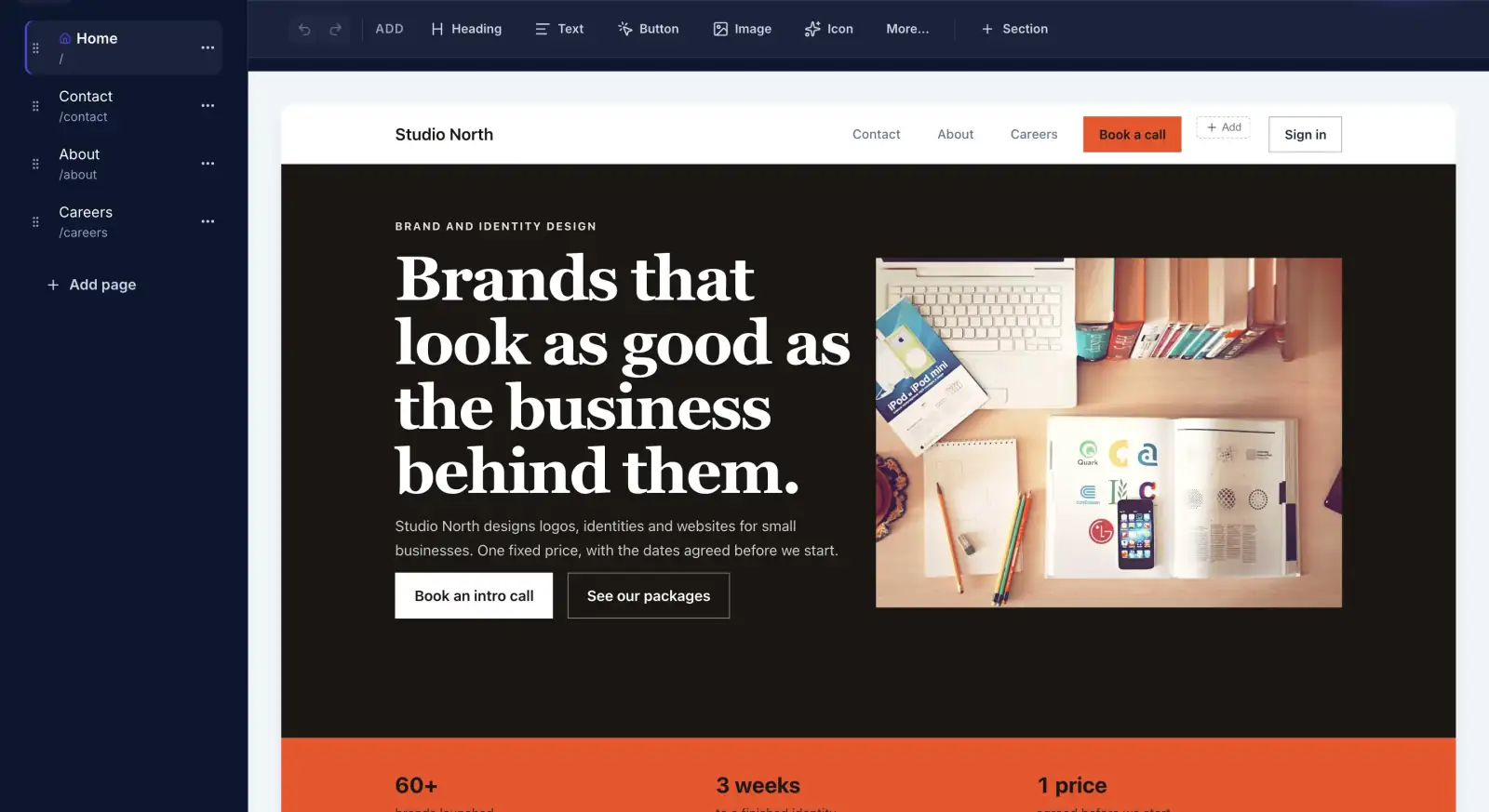
  • Pages made from reusable sections, not a fixed template
  • Copy written from what you told it, ready to edit by hand
  • Laid out for desktop and phone
A finished home page for a design studio, open in the Sites builder
A finished home page in the builder.

Components

Build a section once and use it on every page.

Package cards, team members and testimonials are saved as components with their own fields. Edit the component and move every page that uses it to the new version together, when you are ready.
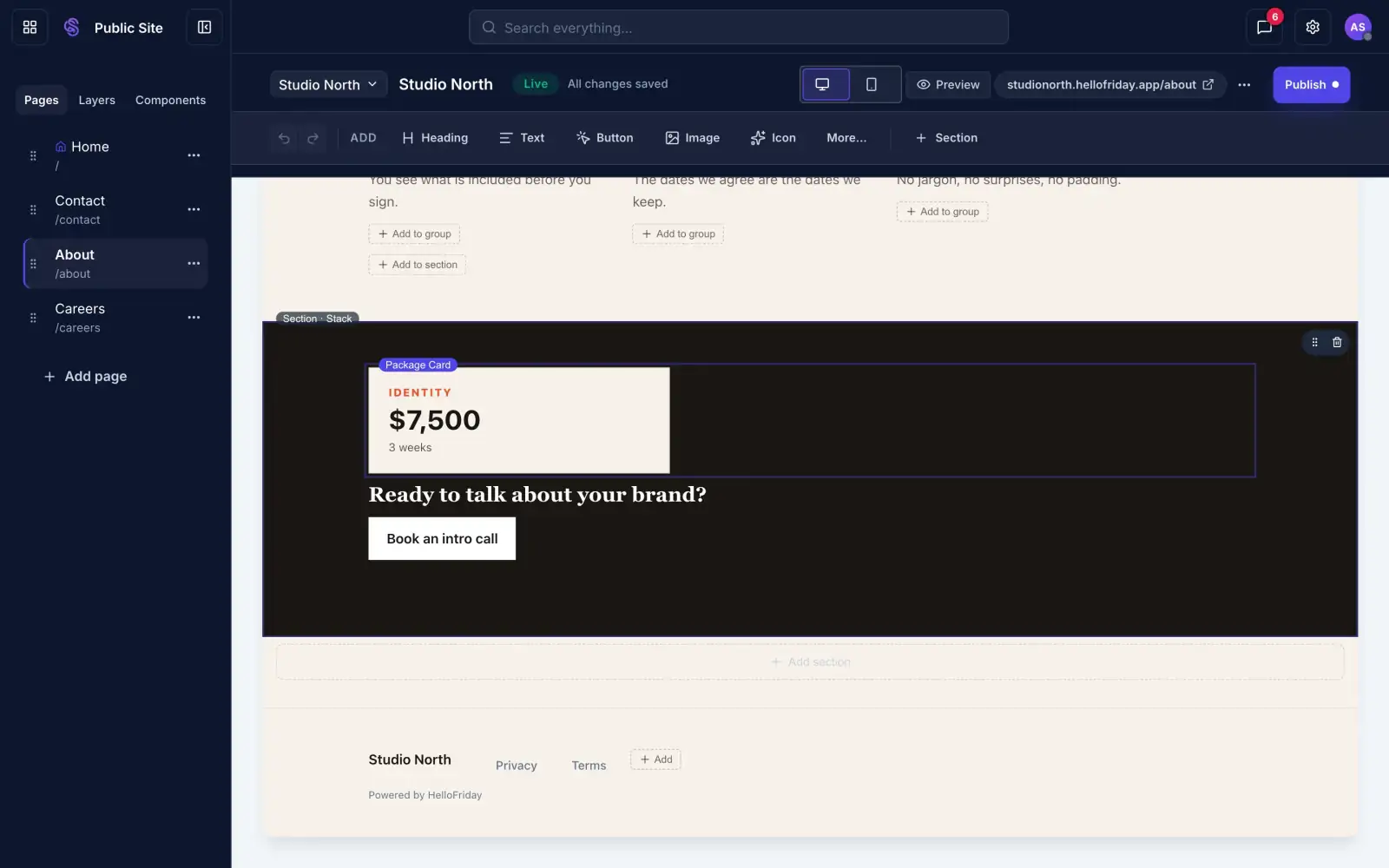
  • One edit, every page brought up to date at once
  • Nothing on a page changes until you say so
  • Friday reuses your components before it makes new ones
A package card selected in the Sites builder and saved as a reusable component
A package card, saved as a component.

Live records

Pages that read your records.

A list on your site can read straight from your data. Add an open role in HelloFriday and it appears on your careers page. Mark it filled and it goes.
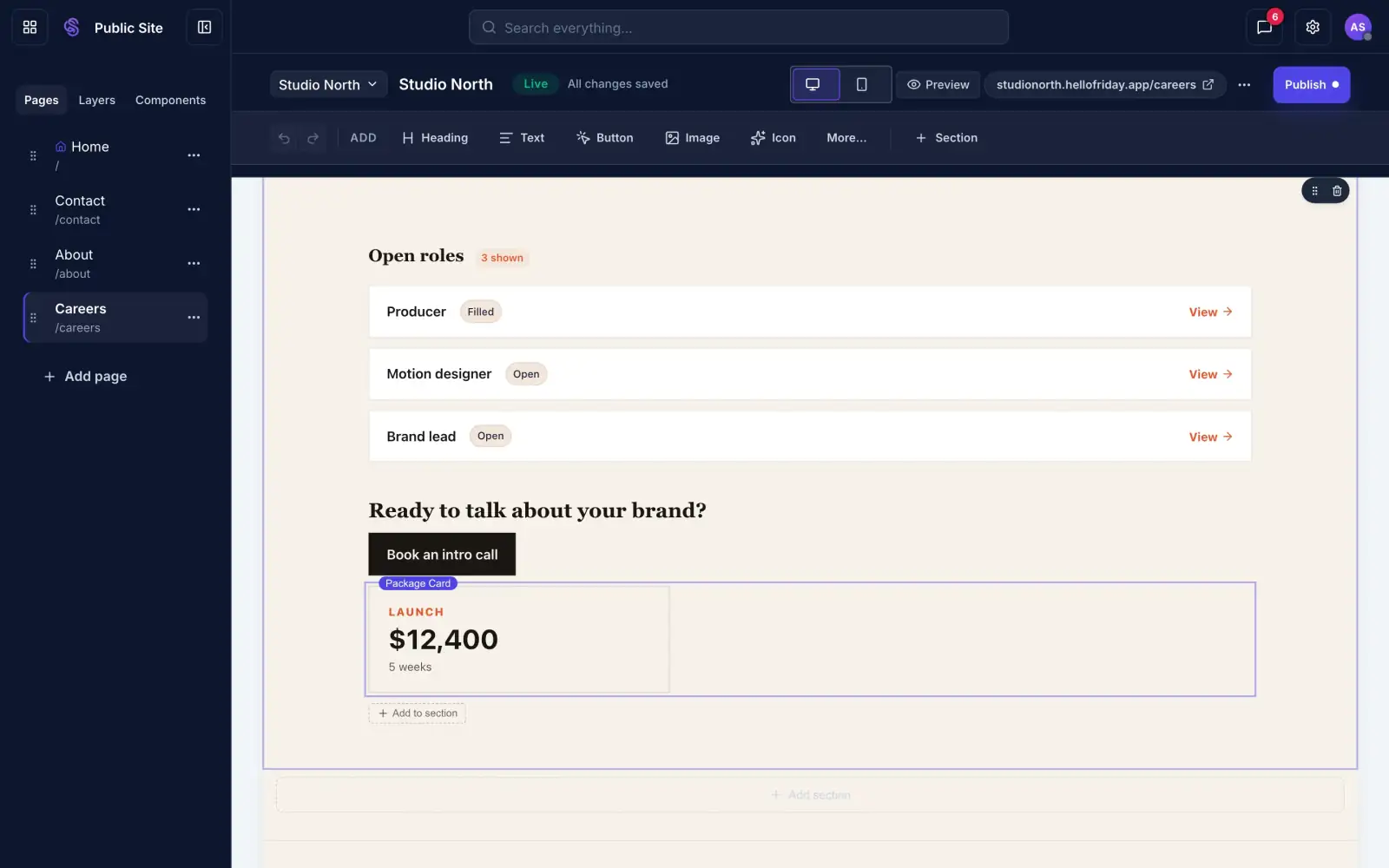
  • Roles, services, properties, events or any table of yours
  • You choose which fields visitors see
  • A page for every record, if you want one
A list of open roles on a Sites page, read from the company's records
Open roles, read from your records.

Your domain

Run it on your own domain.

Point your domain's nameservers at HelloFriday once and the site serves on it over HTTPS, with the certificate set up for you. Until then it runs on a free hellofriday.app address.
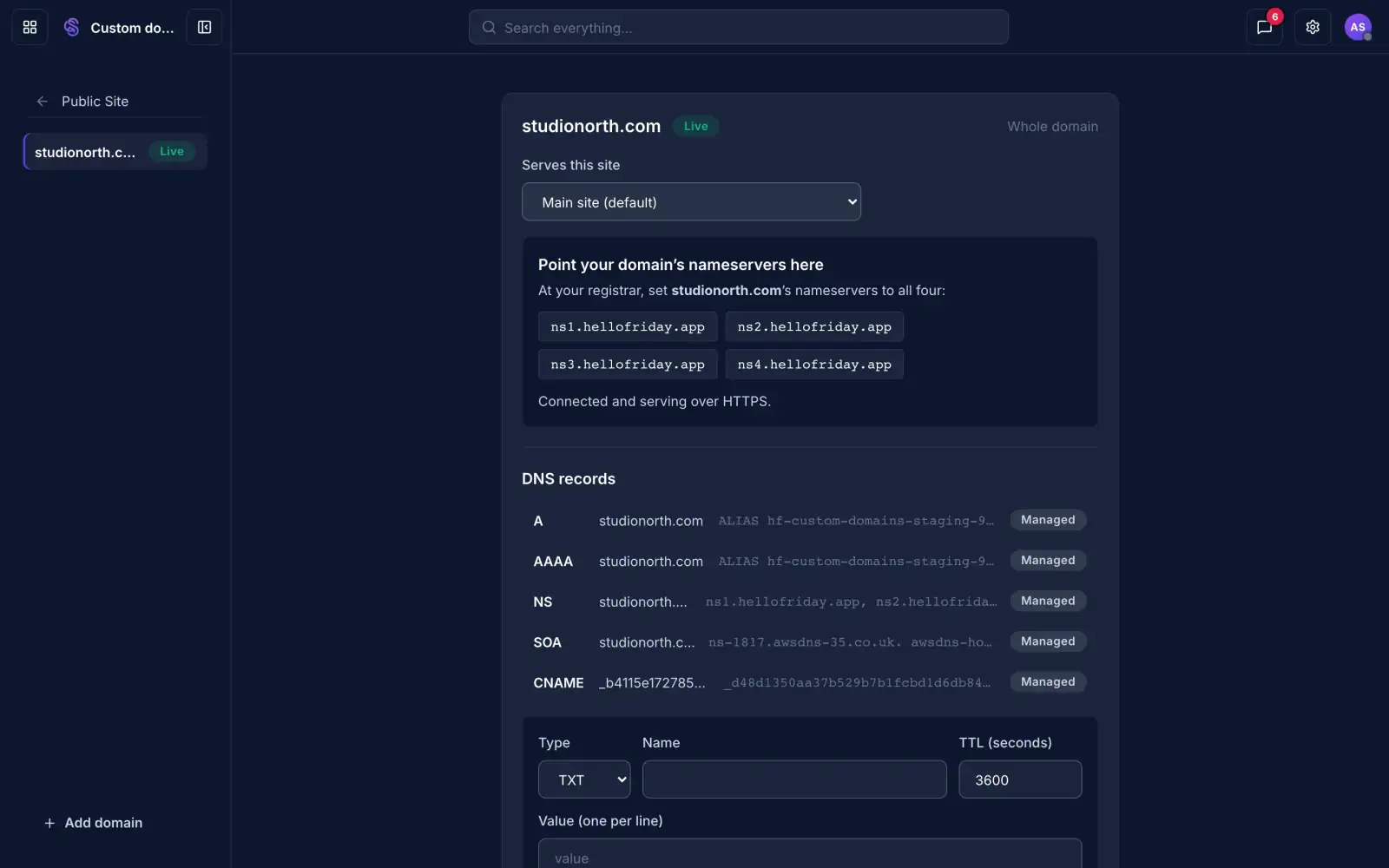
  • studionorth.com instead of studionorth.hellofriday.app
  • Run more than one site from the same workspace
A custom domain connected and serving over HTTPS
A custom domain, connected.

Draft and publish

Nothing goes live until you say so.

You and Friday edit a draft. Visitors keep seeing the live site. When you are happy with the changes, press Publish.
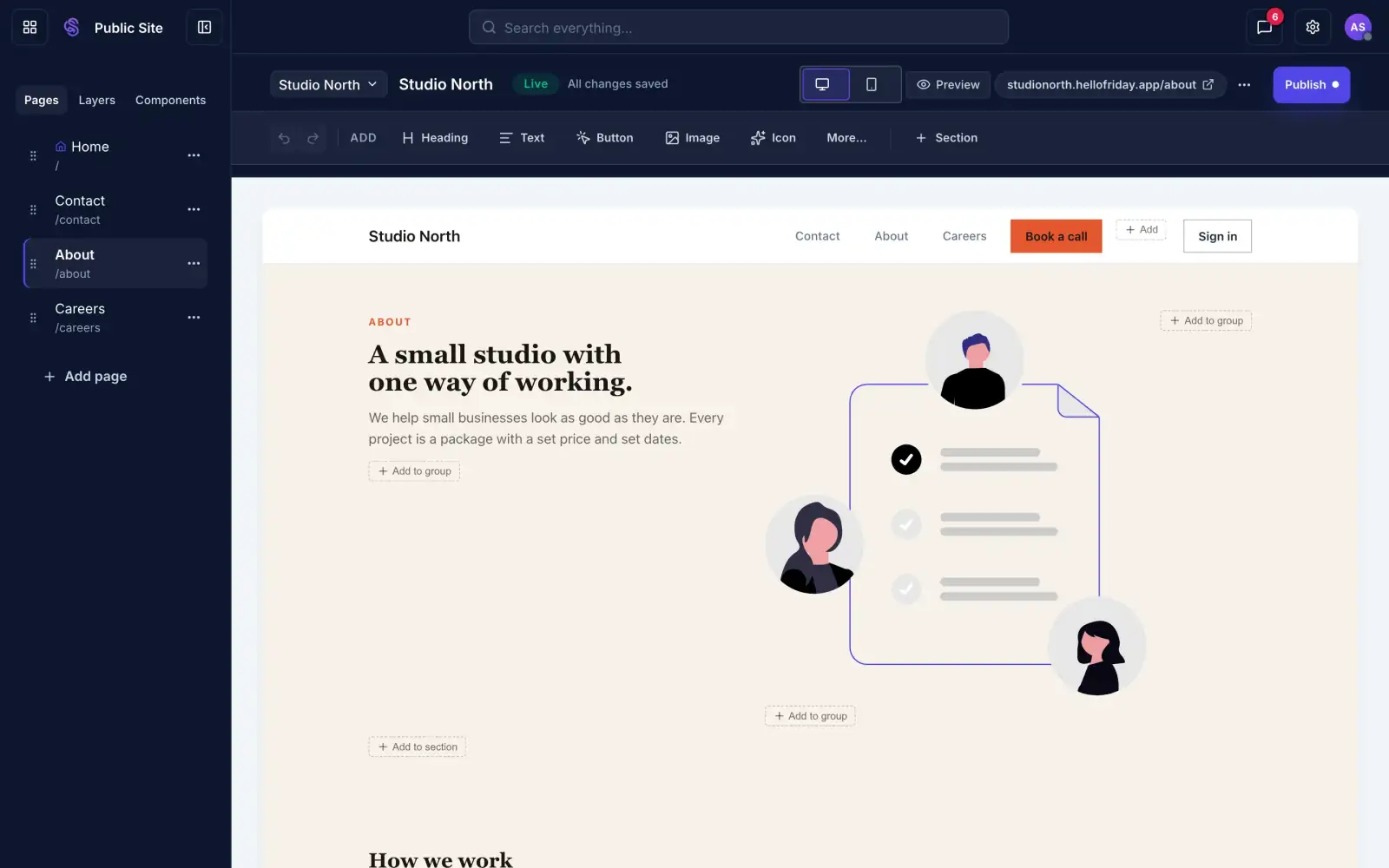
  • Preview on desktop and phone before you publish
  • Undo and redo while you edit
  • Every publish is saved, so you can go back
The Sites builder toolbar with Live status, device preview, Preview and Publish
Preview, then Publish.
Blog

Write a document. Publish a blog post.

A blog on your site is a folder of documents. Write in the Documents editor, mark a post final, and it appears on your blog page with its title, author, date and summary. Drafts stay private.

One editor

Posts are written in the same Documents editor you use for everything else.

Categories from folders

Subfolders become categories on the blog page.

A page for every post

Each finished document gets its own address, with an RSS feed for the blog.

Friday can draft it

Ask Friday for a first draft, then edit it like any document.

All features

Every feature in Sites.

The full list, grouped by what you are trying to do.

Build pagesStart from a conversation, then edit the way you would in any page builder.
  • A first draft from a briefFriday builds Home, About, Contact and Careers with real copy from what you tell it.
  • Visual builderClick any text to edit it. Add headings, text, buttons, images, icons and sections.
  • LayersSee every element on a page in one list and select or reorder it from there.
  • LayoutsStacks, columns and grids, with section backgrounds taken from your palette.
  • Illustrations and iconsA library of illustrations and more than 1,900 icons, so a page does not need stock photos.
  • Your imagesUpload once to the image library and reuse the picture on any page.
Brand itSet the look once and every page follows it.
  • Colours and typePick a brand colour and a font pairing. Corner style and spacing come as one coherent set.
  • Logo and site nameShow your logo or your name in the header and footer, in three sizes.
  • MenusHeader and footer menus with dropdowns, columns and links to your pages.
  • MotionFade, slide, float, parallax and hover effects. They switch off for visitors who ask for reduced motion.
Reuse and connectBuild a block once and let your data fill it.
  • ComponentsSave a card, a pricing tier or a team member with its own fields. Lists inside a component can grow.
  • Update every page togetherEdit a component, then bring every page that uses it up to the new version in one step.
  • Live listsShow open roles, services, properties or events straight from your records.
  • A page for every recordGive each row in a table its own address and page.
  • Values from your recordsFill a price, a name or a quote from a single cell, so it changes when the record does.
  • Forms and bookingEmbed a form, a booking calendar or a document on any page.
Blog and resourcesPublish from the documents you already write.
  • A blog from a folderPoint a page at a folder of documents. Each finished document becomes a post with its own page.
  • CategoriesSubfolders become categories on the blog page.
  • Title, author, date and summaryEach post shows them on the blog page, taken from the document.
  • Drafts stay privateA document appears only when you mark it final.
  • RSS feedThe blog page comes with an RSS feed, so readers can follow it.
  • Draft with FridayAsk for a first draft of a post, then edit it like any document.
Pages and accessControl what is public, what is private and how people find it.
  • Nested pagesPut a page under another one and its address follows, like /services/branding.
  • Private pagesRestrict a page to people signed in to your workspace. It stays out of search and the menu.
  • Show or hide in the headerDecide which pages appear in the menu and which are reached by link.
  • Sign in and registerAdd Sign in and Register buttons to the header and choose which roles can register.
Publish and be foundReview privately, go live when you are ready, and keep a record.
  • Draft and PublishEdit freely. Visitors see the live site until you press Publish.
  • Desktop and phone previewSwitch the preview between desktop and mobile before you publish.
  • Version historyEvery publish is saved. Restore an earlier version into the draft and publish it again.
  • Search and sharingSet a search title, a description and a social image for each page.
  • AnalyticsAdd a Google Analytics ID, or leave it blank to publish with no analytics script.
  • Your own domainServe the site on your domain over HTTPS, with the certificate set up for you.
  • More than one siteRun separate sites from the same workspace and switch between them in the builder.
Working with FridayWhat you can ask Friday for, in plain words.
  • Asks before it buildsFriday asks what the site is for and how you want it to sound, then writes from your answers.
  • Writes the copyHeadlines, paragraphs and buttons for every section, ready for you to edit.
  • Uses your components firstYour existing sections are reused before new ones are made.
  • Looks at the resultAfter building, Friday checks the page on desktop and phone before it shows you.
  • Changes you describeAsk for a new price, a new page or a hidden section in a sentence. The draft changes and you review it.
  • Nothing goes live on its ownChanges stay in draft until you press Publish.
How Sites compares

Sites vs competitors

Claude can write you a website and Webflow can design you a good one. Sites is built on your company's own records, so the site, your documents and your automations all work from the same information. We host it and keep it secure.

HelloFriday SitesClaudeWebflow
Built forThe person running the businessSomeone comfortable reviewing codeDesigners and developers
First draftFriday writes the pages and copy from your brief and your company recordsWrites code and copy from your promptYou design it visually, layout by layout
Knows your businessReads your records, documents and contactsOnly what you paste in or connect yourselfOnly what you enter into its CMS
Design systemColours, type and components set once and reused on every pageNone. Each answer is new codeYou build one in the Designer, which takes design skill
Content that stays currentLists and values read from your recordsFixed until you ask againA CMS you maintain, or add-on tools
AutomationForms, bookings and signed documents start work in the rest of HelloFridayYou wire it up yourselfForms and CMS, with add-on tools for the rest
Hosting and securityIncluded. We host it and keep it patchedYours to host, secure and maintainHosted for you
Changing it laterAsk Friday in a sentence, or edit it yourselfGo back to the chat or edit the codeSomeone who knows the Designer makes the change
Going liveDraft, review, then Publish, with version historyYour own deployment processStaging, then Publish

Sites is the obvious choice for service businesses.

Keeping it current

Six months later, you change it by asking.

Raise a price, add a case study or hide a page. Type the change to Friday, read what it changed in the draft, and publish when it looks right.

1Ask in plain words. There is no editor to learn and no developer to brief.
2See what will change before it changes.
3Publish when you are happy and it is live on your domain.
studionorth.hellofriday.app/servicesTue 3 Mar
Raise the sprint to $15,500, make it 7 weeks, and add the Halden case study
Updated the Package card and added a case study section. Want to review it before I publish?
Draft updated. Nothing is live until you publish.
Changes to /services
Price$14,200$15,500
Duration6 weeks7 weeks
AddedCase study: Halden rebrand
Publish these changes
How it works

From your first description to changes after launch.

Six steps, and nothing goes live until you say so.

Describe your business

A few sentences on what you do, who you work with and how you want to sound. If Friday needs more, it asks.

You

Your pages are built

Sections come from your component library, the copy is written from your brief, and your colours, fonts and menus are set.

Friday

Review the draft

Look through it on desktop and phone. Edit any text yourself, or ask Friday to change it.

You

Press Publish

The live site changes when you publish and not before.

You

Ask for changes later

Ask in a sentence. The draft changes and you review the result before it goes live.

Friday

Listings stay current

Roles, services and other lists read from your records, so they follow your data without anyone editing the page.

Automatic
Examples

What you can build

Spring launchBook your free brand reviewReserve a time

A landing page for one job

A campaign page with a form or a booking calendar and nothing else on it. Build a new one for each launch, ad or event.

Brand sprint$14,200Book a call

A full site for a service firm

Packages and prices set up once, a booking calendar, case studies and a contact form, all reading from your records.

Motion designerBrand leadProducer

A careers hub

Open roles from your records, a page for each role and an application form. Mark a role filled and it leaves the page.

Getting started with your accountHelp centre · Updated 15 OctFinal

A blog or help centre

Write in Documents and publish a folder as a site. Categories come from subfolders, and drafts stay private.

Signed in onlyProject planInvoices

A private area for clients or staff

Pages only people signed in to your workspace can read, kept out of search and the menu.

12 Harbour Street · Open SaturdayBrand 101 · Starts 3 NovStudio tour · Fully booked

Listings that stay current

Properties, courses, events or anything in a table, each with its own page, updated when the record changes.

studionorth.comlaunch.studionorth.comcareers.studionorth.com

Several sites, one workspace

A main site, a campaign microsite and a careers site, each on its own domain and managed from the same place.

Or anything you can imagine.

Describe it to Friday, review the draft and publish when it is right.

Questions about Sites

Can I use my own domain?

Yes. Point your domain's nameservers at HelloFriday once and the site serves on it over HTTPS. Until then it runs on a free hellofriday.app address.

Can I edit the site myself?

Yes. Click any text in the builder and type, or add sections yourself. Asking Friday is a shortcut and never a requirement.

What happens to my current website?

Nothing, until you point your domain at HelloFriday. Build and review the new site first, then switch when you are ready.

Will Friday publish without me?

No. Friday edits the draft. Visitors see a change only after you press Publish.

How do pages stay up to date?

Lists and values can read from your records, so a new role or price appears when you add it. For anything else, ask Friday and review the change.

Does it work on phones?

Yes. Pages are laid out for desktop and phone, and you can preview both before you publish.

What does it cost?

The free plan includes one public page. Pricing shows what the other plans include.

Works with the rest of your workspace

Forms

Put an enquiry or application form on a page. Responses land in your records.

Scheduling

Let visitors book a time with you from the page.

Documents

Publish finished documents as pages on your site.

CRM

Keep the people who visit and enquire in one place.

Tell Friday about your business.

Start free and review your first draft.

Your work emailGet started

Free to start. The free plan includes one public page.